Building effective agents
Agentic pattern
We’re doing something different today. Instead of a typical article, this is a code along tutorial based on Anthropic’s foundational blogpost on agentic patterns : Building effective agents.
The objective of this article is to demystify the complexity of agentic workflows by presenting a simple and clear Python implementation of the core concepts defined in the Anthropic article.
0) Set-up
Replicating this exercise is possible with any LLM provider that is compatible with the Openai Client library and the set-up is minimal. We just need the LLM client, pydantic for structured output and json to parse the response.
# --- Libraries ---
import openai
from pydantic import BaseModel
from pydantic import BaseModel, Field
import json
from typing import Literal, TypedDict
1) Prompt chaining
Prompt chaining decomposes a task into a sequence of steps, where each LLM call processes the output of the previous one.
In this simple example we are going to create a chain (sequence) of prompts (generate_joke,improve_joke,polish_joke) in order to generate an output (a joke).
The chain represents the simplest workflow pattern, marking the first step in complexity beyond standard one-shot prompting for generating answers.
# --- State ---
state = {
    "topic": "",
    "joke": "",
    "improved_joke": "",
    "final_joke": ""
}
# --- Functions ---
def generate_joke(topic: str) -> str:
    response = client.chat.completions.create(
        messages=[{"role": "user", "content": f"Write a joke about {topic} with just single a sentence"}],
    )
    return response.choices[0].message.content

def improve_joke(joke: str) -> str:
    response = client.chat.completions.create(
        messages=[{"role": "user", "content": f"Make this joke funnier by adding wordplay or puns: {joke}"}],
    )
    return response.choices[0].message.content

def polish_joke(joke: str) -> str:
    response = client.chat.completions.create(
        messages=[{"role": "user", "content": f"""
                Write a short, funny joke in the following format:
                Why did [subject] [action]?
                To [funny reason related to the subject]!
                The joke should be based on the following : {joke}
                """}],
    )
    return response.choices[0].message.content

def check_punchline(joke: str) -> bool:
    return joke.count("?") >= 1

# --- Workflow Execution ---
def run_workflow(topic: str):
    state["topic"] = topic
    state["joke"] = generate_joke(topic)
    state["improved_joke"] = improve_joke(state["joke"])
    state["final_joke"] = polish_joke(state["improved_joke"])
    if check_punchline(state["final_joke"]):
        print(state["final_joke"])
    else :
        print("joke did not passed quality gate")
    return state
# --- Run ---
result = run_workflow("cats at work")
2) Routing
Routing classifies an input and directs it to a specialized followup task.
In this example, we use an initial LLM call to determine the next step whether to generate a poem, a story, or a joke, and then execute only the selected route.
The routing pattern is particularly interesting because it leverages specialization in prompts and data sources. Instead of having one generalist ‘agent’ that knows everything, it is more efficient to employ multiple specialized agents that the router can direct tasks to as needed.
# --- Schema for routing ---
class Route(BaseModel):
    step: Literal["poem", "story", "joke"] = Field(
        None, description="The next step in the routing process"
    )
# --- State ---
class State(TypedDict):
    input: str
    decision: str
    output: str
# --- Router using structured output ---
def llm_call_router(state: State) -> dict:
    response = client.chat.completions.create(
        messages=[
            {"role": "system", "content": "Route the input to story, joke, or poem based on the user's request."},
            {"role": "user", "content": state["input"]},
        ],
        response_format={
            "type": "json_schema",
            "json_schema": {
                "name": "route",
                "schema": {
                    "type": "object",
                    "properties": {
                        "step": {
                            "type": "string",
                            "enum": ["poem", "story", "joke"]
                        }
                    },
                    "required": ["step"]
                }
            }
        },
    )
    decision = json.loads(response.choices[0].message.content)
    return {"decision": decision["step"]}
# --- Nodes ---
def llm_call_story(state: State) -> dict:
    response = client.chat.completions.create(
        messages=[{"role": "user", "content": f"Write a story about: {state['input']}"}],
    )
    return {"output": response.choices[0].message.content}

def llm_call_joke(state: State) -> dict:
    response = client.chat.completions.create(
        messages=[{"role": "user", "content": f"Write a joke about: {state['input']}"}],
    )
    return {"output": response.choices[0].message.content}

def llm_call_poem(state: State) -> dict:
    response = client.chat.completions.create(
        messages=[{"role": "user", "content": f"Write a poem about: {state['input']}"}],
    )
    return {"output": response.choices[0].message.content}

# --- Routing Logic ---
def route_decision(state: State) -> str:
    if state["decision"] == "story":
        return "story"
    elif state["decision"] == "joke":
        return "joke"
    elif state["decision"] == "poem":
        return "poem"

# --- Workflow Execution ---
def run_workflow(user_input: str):
    state: State = {"input": user_input, "decision": "", "output": ""}
    # Step 1: Route
    route_result = llm_call_router(state)
    state["decision"] = route_result["decision"]
    # Step 2: Execute based on decision
    if state["decision"] == "story":
        state.update(llm_call_story(state))
    elif state["decision"] == "joke":
        state.update(llm_call_joke(state))
    elif state["decision"] == "poem":
        state.update(llm_call_poem(state))
    return state

# --- Run ---
result = run_workflow("Write me a short story about cats at work")
3) Parallelization
Breaking a task into independent subtasks run in parallel.
Unlike the previous example, which decided between a poem, a story, or a joke, this case involves generating all three in parallel and then aggregating the results.
This is a typical pattern across computer science: when a problem is too complex or slow for a single computation, it is broken down into simpler ones to achieve greater efficiency and reduced processing time.
# --- State ---
class State(TypedDict):
    topic: str
    joke: str
    story: str
    poem: str
    combined_output: str

# --- LLM Call Functions ---
def call_llm(prompt: str) -> str:
    response = client.chat.completions.create(
        messages=[{"role": "user", "content": prompt}],
    )
    return response.choices[0].message.content

def call_llm_1(state: State) -> dict:
    return {"joke": call_llm(f"Write a joke about {state['topic']}")}

def call_llm_2(state: State) -> dict:
    return {"story": call_llm(f"Write a story about {state['topic']}")}

def call_llm_3(state: State) -> dict:
    return {"poem": call_llm(f"Write a poem about {state['topic']}")}

def aggregator(state: State) -> dict:
    combined = f"Here's a story, joke, and poem about {state['topic']}!\n\n"
    combined += f"STORY:\n{state['story']}\n\n"
    combined += f"JOKE:\n{state['joke']}\n\n"
    combined += f"POEM:\n{state['poem']}"
    return {"combined_output": combined}

# --- Workflow Execution ---
def run_workflow(topic: str) -> State:
    state: State = {"topic": topic, "joke": "", "story": "", "poem": "", "combined_output": ""}
    # Run tasks in parallel (or sequentially for simplicity)
    state.update(call_llm_1(state))
    state.update(call_llm_2(state))
    state.update(call_llm_3(state))
    # Aggregate results
    state.update(aggregator(state))
    return state

# --- Run ---
result = run_workflow("cats")
4) Evaluator-optimizer
In the evaluator-optimizer workflow, one LLM call generates a response while another provides evaluation and feedback in a loop.
In this example, we implement a feedback loop: the evaluator grades the generated joke and returns feedback to the generator until the resulting joke is deemed satisfactory.
This is a highly interesting pattern as it represents a significant step toward true autonomy. In this case, two ‘agents’ collaboratively ’think’ about a problem until they reach consensus that it is solved, operating without any human intervention or feedback.
class State(TypedDict):
    joke: str
    topic: str
    feedback: str
    funny_or_not: str

# --- Schema for evaluation ---
def llm_call_evaluator(state: State) -> dict:
    response = client.chat.completions.create(
        messages=[
            {"role": "system", "content": "Grade the joke as funny or not funny and provide feedback if needed."},
            {"role": "user", "content": f"Joke: {state['joke']}"}
        ],
        response_format={
            "type": "json_schema",
            "json_schema": {
                "name": "feedback",
                "schema": {
                    "type": "object",
                    "properties": {
                        "grade": {"type": "string", "enum": ["funny", "not funny"]},
                        "feedback": {"type": "string"}
                    },
                    "required": ["grade", "feedback"]
                }
            }
        },
    )
    result = json.loads(response.choices[0].message.content)
    return {"funny_or_not": result["grade"], "feedback": result["feedback"]}

# --- Joke Generator ---
def llm_call_generator(state: State) -> dict:
    if state.get("feedback"):
        prompt = f"Write a joke about {state['topic']} but improve it based on this feedback: {state['feedback']}"
    else:
        prompt = f"Write a joke about {state['topic']}"
    response = client.chat.completions.create(
        messages=[{"role": "user", "content": prompt}],
    )
    return {"joke": response.choices[0].message.content}

# --- Workflow ---
def run_workflow(topic: str, max_loops: int = 5):
    state: State = {"topic": topic, "joke": "", "feedback": "", "funny_or_not": ""}
    for i in range(max_loops):
        # Generate joke
        state.update(llm_call_generator(state))
        # Evaluate joke
        eval_result = llm_call_evaluator(state)
        state.update(eval_result)
        if state["funny_or_not"] == "funny" and  i>0 :
            print(" -- Joke accepted! --")
            break
        else:
            print("Joke rejected, improving...")
    return state

# --- Run ---
result = run_workflow("cats at work")
5) Agents
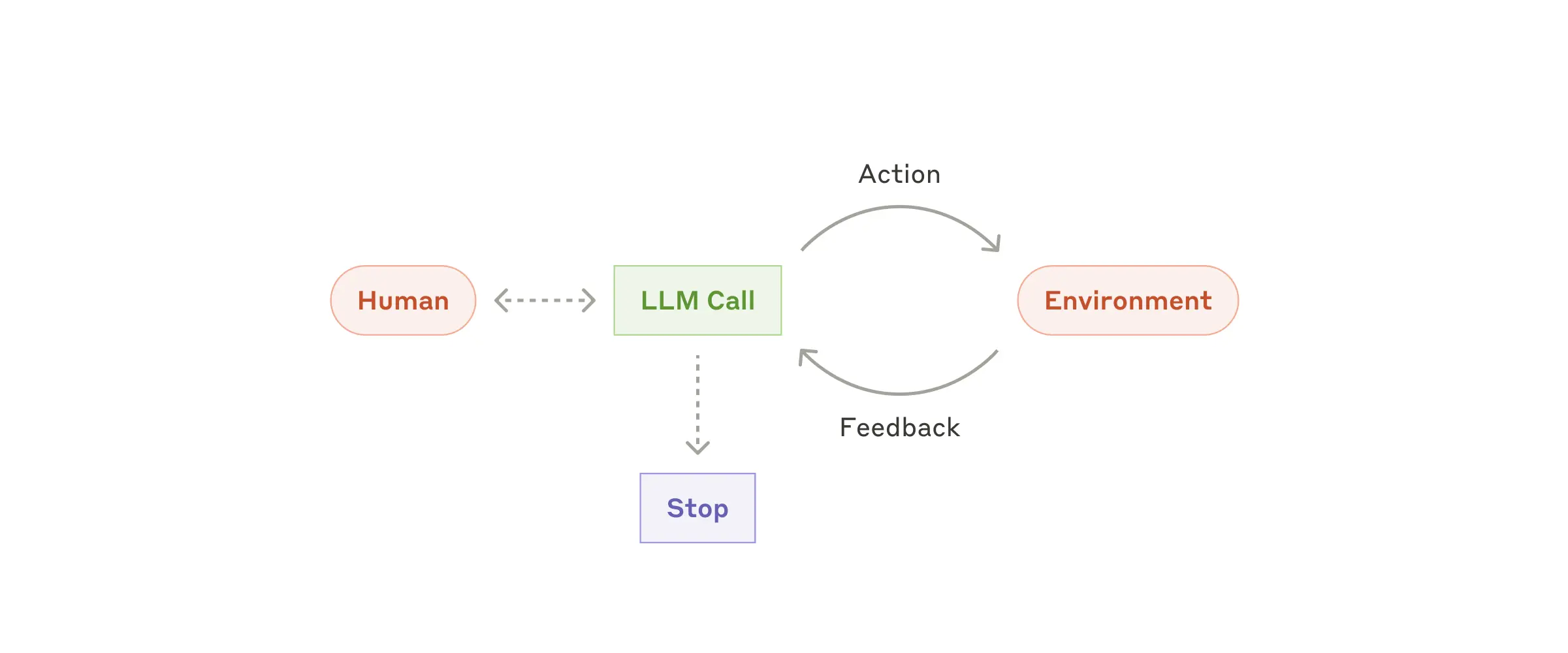
Agents are emerging in key capabilities—understanding complex inputs, engaging in reasoning and planning, using tools reliably, and recovering from errors.
Finally, we demonstrate an example of a truly autonomous agent. Though limited to arithmetic tools in this case, the agent can receive a task, reason, plan which tools to use, execute those tools, and autonomously stop the reasoning process when it is ready to generate the final answer to the user.
# --- Define Python functions ---
def multiply(a: int, b: int) -> int:
    return a * b

def add(a: int, b: int) -> int:
    return a + b

def divide(a: int, b: int) -> float:
    return a / b

# --- Define tool schemas ---
tools = [
    {
        "name": "multiply",
        "description": "Multiply two integers",
        "parameters": {
            "type": "object",
            "properties": {
                "a": {"type": "integer", "description": "First integer"},
                "b": {"type": "integer", "description": "Second integer"}
            },
            "required": ["a", "b"]
        }
    },
    {
        "name": "add",
        "description": "Add two integers",
        "parameters": {
            "type": "object",
            "properties": {
                "a": {"type": "integer", "description": "First integer"},
                "b": {"type": "integer", "description": "Second integer"}
            },
            "required": ["a", "b"]
        }
    },
    {
        "name": "divide",
        "description": "Divide two integers",
        "parameters": {
            "type": "object",
            "properties": {
                "a": {"type": "integer", "description": "First integer"},
                "b": {"type": "integer", "description": "Second integer"}
            },
            "required": ["a", "b"]
        }
    }
]
# --- Map tool names to Python functions ---
tools_by_name = {
    "multiply": multiply,
    "add": add,
    "divide": divide
}
import json

# --- Workflow ---
def run_agent(user_input: str, max_iterations: int = 5):
    messages = [
        {"role": "system", "content": "You are a helpful assistant tasked with performing arithmetic on a set of inputs."},
        {"role": "user", "content": user_input}
    ]
    for i in range(max_iterations):
        response = client.chat.completions.create(
            model=model,
            messages=messages,
            tools=tools,
            tool_choice="auto"
        )
        last_message = response.choices[0].message
        tool_calls = last_message.tool_calls
        # Keep the last LLM message in history
        messages.append({"role": "assistant", "content": last_message.content, "tool_calls": tool_calls})
        if tool_calls:
            print(f"\n Iteration {i+1}: Tool calls detected")
            # Execute tool calls
            for call in tool_calls:
                func_name = call.function.name
                args = json.loads(call.function.arguments)
                # Print tool name and arguments
                print(f" Calling tool: {func_name} with arguments: {args}")
                result = tools_by_name[func_name](**args)
                # Append tool response
                messages.append({
                    "role": "tool",
                    "tool_call_id": call.id,
                    "content": str(result)
                })
        else:
            # No tool calls → final answer
            print(f"\nFinal answer after {i+1} iterations: {last_message.content}")
            return last_message.content
    return "Max iterations reached without a final answer."
# --- Run ---
answer = run_agent("Please multiply 3 and 4 and divide the result by 2")
Conclusion
I hope these examples have helped the reader realise the simplicity behind the patterns for implementing agentic workflows. While using higher-level packages like LangChain offers ‘shorter’ implementation methods, this often obscures the underlying details. To truly understand these core concepts, I believe a simpler approach using just the API and basic Python is most effective.